QR Code Tracking: How to Track Scans in 2026
QR codes are everywhere now. Menus, flyers, business cards, packaging, real estate signs, event badges, direct mail, table tents. That part is no longer interesting.
The interesting part is this: can you tell which QR code actually worked?
Most teams cannot. They print one code, send every scan to the same page, then call it a day. Maybe they know total scans. Maybe they do not. But they usually cannot answer the questions that matter:
- Which poster drove the most scans?
- Did the scans turn into leads or sales?
- Did the QR code on the receipt beat the QR code by the register?
- Which location, event, package, or CTA performed best?
- Should we reprint this campaign, change the offer, or kill it?
That is what QR code tracking is for.
With the right setup, a QR code is not just a shortcut to a web page. It is an offline attribution tool. It lets you measure physical marketing with the same discipline you bring to email, ads, and social.
What is QR code tracking?
QR code tracking is the process of measuring what happens when someone scans a QR code.
At the basic level, that means scan count. How many times did people scan it?
At the useful level, it means campaign attribution:
- Where the scan came from
- Which physical placement drove it
- What device was used
- When the scan happened
- Which destination the person visited
- Whether the person converted
- Which campaign should get credit
The best setup uses a dynamic QR code that points to a short link. The short link records the scan, redirects the visitor, and keeps the destination editable after the code is printed.
That last part matters. If you print 2,000 flyers and the landing page changes next week, you do not want to reprint 2,000 flyers. You want to update the destination behind the code and move on.
Why QR code tracking matters in 2026
QR codes crossed the "will people scan this?" line a while ago.
Uniqode's State of QR Codes 2026 report, released March 18, 2026 and based on 524 marketers, 1,000 consumers, and 188 million scans, found that 98% of marketers report a positive impact from QR codes and 71% of consumers say QR codes are useful in daily life.
That is the good news.
The gap is measurement. In the same report, 56% of marketers said they expect QR codes to drive higher revenue, but only 12% currently measure their impact on revenue.
That is a pretty big miss.
It means a lot of teams are using QR codes, but they are still treating them like print decorations. A code gets added to the flyer because it feels modern. Nobody defines the goal. Nobody sets up UTMs. Nobody gives each placement its own link. Then the campaign ends and everyone shrugs.
Do better than that. The setup is not complicated.

How QR code tracking works
Here is the clean version:
- Create a destination URL with UTM parameters.
- Shorten that URL with a trackable short link.
- Generate a QR code for the short link.
- Use a unique QR code or short link for each placement.
- Track scans in your QR/link dashboard.
- Track sessions, leads, and purchases in Google Analytics, your CRM, or your ecommerce platform.
The QR code itself is just the entry point. The short link and UTMs are what make attribution work.
Google's own URL builder documentation explains that UTM parameters help Analytics identify which campaigns referred traffic. For QR campaigns, that means you can stop lumping offline traffic into "direct" and start seeing which print placements drove real visits.
Static QR code vs dynamic QR code for tracking
If you care about tracking, use a dynamic QR code.
A static QR code stores the final destination directly inside the code. Once printed, it is locked. You usually cannot change the destination, and you usually do not get scan analytics unless the final destination has its own tracking setup.
A dynamic QR code points to a managed redirect first. That gives you:
- Scan analytics
- Editable destinations
- Cleaner printed codes
- Safer campaign management
- Better attribution by placement
Static QR codes are fine for simple, permanent things like WiFi access or a fixed phone number. For marketing, events, menus, packaging, and print campaigns, dynamic is usually the better choice.
For a deeper comparison, read Dynamic QR Codes vs Static QR Codes.
The QR tracking setup I recommend
If I were setting this up for a small business, event, or campaign team, I would keep it simple.
1. Decide what you want to learn
Do not start by making the QR code. Start with the question.
Examples:
- Which trade show booth sign drives the most demo requests?
- Do table tents get more menu scans than front-door posters?
- Does product packaging drive repeat purchases?
- Which direct mail neighborhood scans most?
- Which flyer version gets more signups?
One campaign can have a lot of QR codes, but each one should answer a specific question.
2. Give every placement its own short link
This is the part people skip.
If you use the same QR code everywhere, you can only measure the campaign as a whole. That is better than nothing, but not by much.
Instead, create one short link per placement.
Example:
| Placement | Short link | Purpose |
|---|---|---|
| Front window poster | go.yourbrand.com/spring-window |
Measure walk-by interest |
| Receipt footer | go.yourbrand.com/spring-receipt |
Measure post-purchase scans |
| Table tent | go.yourbrand.com/spring-table |
Measure in-store engagement |
| Direct mail card | go.yourbrand.com/spring-mailer |
Measure neighborhood response |
This naming convention keeps the data clean. It also helps your team understand the campaign six months later.
3. Add UTMs before you shorten the link
UTMs are the labels your analytics tool reads.
For QR codes, I like this pattern:
utm_source=qr
utm_medium=offline
utm_campaign=spring_launch
utm_content=front_window_poster
That last field, utm_content, is where placement-level tracking gets useful. It lets you compare the front window poster against the receipt footer, table tent, insert card, or package label.
You can build these manually, use Google's Campaign URL Builder, or use T.LY's UTM URL Builder.
Then shorten the full tracked URL so people never see the messy version.
4. Generate the QR code from the short link
Once the short link exists, create the QR code from that short link.
This gives you two layers of reporting:
- T.LY shows link and QR activity.
- Google Analytics shows campaign sessions and conversions after the redirect.
That combination is much stronger than either one alone.
T.LY automatically creates QR codes for shortened links, or you can start with the QR Code Generator.
5. Test the scan path before printing
Before anything goes to print, test it like a normal person would use it.
Scan the code on an iPhone and Android phone. Check the preview URL. Open the destination. Make sure the page loads fast on mobile. Submit the form or complete the purchase if that is the goal. Confirm that the UTM parameters show up in your analytics tools.
This takes five minutes. It can save you a very annoying reprint.
What QR code metrics should you track?
Do not obsess over every number. Track the ones that help you make a decision.
Total scans
This is the basic demand signal. It tells you whether people noticed the code and cared enough to scan.
Total scans are useful, but they are not the whole story. A code can get a lot of scans and still drive weak results if the offer is wrong.
Unique scans
Unique scans help you avoid overcounting repeat scanners. If one person scans the same code five times, you probably do not want to treat that as five interested people.
Scans by placement
This is where QR code tracking starts paying off.
A poster near the door may beat a flyer. A table tent may beat a receipt. Packaging may beat social. You will not know unless each placement gets its own link or QR code.
Scans by time
Scan timing helps you understand context.
Restaurants might see scans around lunch and dinner. Events might see spikes during breaks. Retail stores might see scan activity after work. That can affect staffing, offers, and when you promote the campaign.
Device and location
Device data helps you spot mobile issues. If most scans are iPhone but Android conversion is weak, test the page on Android.
Location data is useful for regional campaigns, but do not overread it. IP-based location is directional, not perfect.
Conversion rate
This is the big one.
A scan is not the finish line. The scan starts the visit. The business result happens after that:
- Lead form submitted
- Coupon claimed
- Menu viewed
- Demo booked
- Product purchased
- App installed
- Review left
- Donation completed
Set up the conversion event in your analytics tool. Otherwise, you are just counting curiosity.
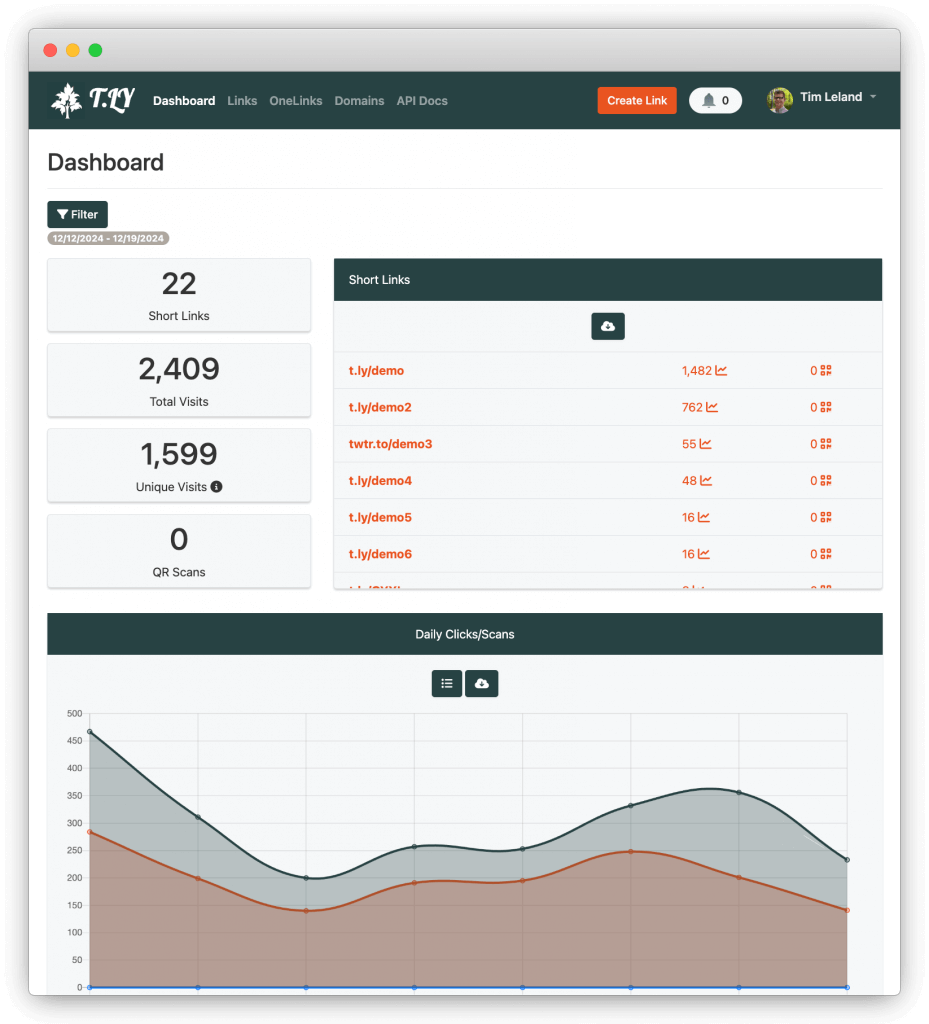
A T.LY dashboard showing total visits, unique visits, QR scans, short links, and a daily clicks/scans chart over time.
QR code tracking with Google Analytics
Google Analytics 4 can report traffic from QR codes when the destination URL includes UTMs.
The important fields are:
utm_source: where the traffic came fromutm_medium: the channel typeutm_campaign: the campaign nameutm_content: the specific placement, CTA, or creative
Google's campaign and traffic sources documentation explains how Analytics collects and reports traffic-source data. The practical point is simple: if you want QR scans to show up as a campaign instead of mystery traffic, tag the destination URL.
Here is a real-world example:
https://example.com/spring-offer
?utm_source=qr
&utm_medium=offline
&utm_campaign=spring_launch
&utm_content=table_tent
Then shorten it:
https://t.ly/spring-table
The printed QR code points to the short link. The short link redirects to the tracked destination. Your short-link analytics records the scan/click, and GA4 records the campaign session.
Clean outside. Measurable inside.
How to connect QR scans to revenue
This is where most teams stop too early.
To connect scans to revenue, you need three things:
- A tracked QR link
- A conversion event
- A way to connect the session to the sale or lead
For ecommerce, that may be a purchase event in GA4 or your store analytics. For lead generation, it may be a form submission, booked meeting, or CRM lead source. For a local business, it may be a coupon code, reservation, or order page.
If revenue attribution feels messy, start smaller:
- Track scans by placement.
- Track landing page visits by UTM.
- Track the main conversion.
- Compare conversion rate by placement.
- Keep the winner and replace the weak placements.
You do not need a perfect attribution model to make better decisions. You need enough signal to stop guessing.
QR code tracking best practices
Use a branded domain
Trust matters more with QR codes because people cannot see the full URL until after they scan.
The FTC has warned consumers that scammers use QR codes to hide harmful links and send people to spoofed sites. That does not mean people should stop scanning QR codes. It means brands should make the scan feel legitimate.
A branded short domain helps. So does a clear CTA beside the code.
Bad:
Scan me
Better:
Scan to see the lunch menu
go.yourrestaurant.com/menu
People should know what they are scanning and where they are going.
Put a human-readable URL near the code
This helps for trust and accessibility. If someone does not want to scan, they can still type the link.
It also makes the code feel less suspicious. A QR code sitting alone on a sticker asks people to trust a black-and-white square. A QR code with a branded short URL and clear CTA asks much less.
Use one code per placement
If you want placement-level data, do not reuse one QR code everywhere.
Make separate links for:
- Poster
- Flyer
- Direct mail
- Business card
- Event badge
- Product package
- Receipt
- Table tent
- Storefront sign
Yes, it takes a little more setup. That is the whole point. The setup creates the data.
Keep landing pages mobile-first
QR traffic is mobile traffic. Build for that.
The page should load fast, explain the offer quickly, and make the next action obvious. If the page is slow or the form is annoying, your scan data will look fine while your conversion data quietly suffers.
Use dynamic QR codes for anything printed
If the code is going on paper, packaging, signage, stickers, or anything expensive to replace, use a dynamic QR code.
You can edit the QR code destination later without reprinting the code.
Keep QR codes scannable
Tracking does not matter if people cannot scan the code.
Use strong contrast. Keep enough white space around the code. Do not print it too small. Test it in the actual environment, not just on your laptop screen.
If you are sending artwork to print, read the QR code printing guide and QR Codes Correction Levels.
Common QR tracking mistakes
Mistake 1: Using one QR code for every placement
This gives you total scans but weak insight.
If the campaign works, you will not know why. If it fails, you will not know what to fix.
Mistake 2: Forgetting UTMs
Short-link analytics and QR analytics are useful. But if you also use GA4, UTMs connect the scan to website behavior.
Do not wait until after the campaign launches. Add UTMs before you shorten the link and print the QR code.
Mistake 3: Tracking scans but not conversions
Scans are easy to count, so teams overvalue them.
A campaign with 500 scans and 50 purchases beats a campaign with 5,000 scans and no real action.
Mistake 4: Changing destinations without documenting it
Dynamic QR codes let you update the destination. Great. But keep notes.
If you change the destination halfway through a campaign, mark the date. Otherwise, your analytics can get confusing fast.
Mistake 5: Making the code look untrustworthy
No CTA. No branded URL. No context. Random sticker energy.
Do not do that. Give people a reason to scan.
Where QR tracking works especially well
Restaurants
Track menu scans by table, patio, front door, receipt, or takeout insert. You can see where customers engage and which placements drive orders, reservations, or loyalty signups.
Events
Use separate QR codes for booth signage, handouts, badges, session slides, and sponsor materials. After the event, you can see which placements created leads instead of relying on vibes.
Retail and product packaging
Packaging is getting more connected. GS1 US describes Sunrise 2027 as a shift from 1D UPC barcodes to 2D barcodes like QR codes, with more product transparency and richer data.
Even if you are not dealing with GS1 Digital Link today, the direction is obvious: products are becoming digital entry points.
Track packaging scans by product, batch, retail partner, region, or campaign. Then connect those scans to education, registration, reviews, replenishment, or loyalty.
Real estate
Use unique QR codes for yard signs, flyers, open house sheets, and mailers. Track which properties and neighborhoods drive actual buyer interest.
Direct mail
Direct mail gets much more useful when each mailer version, region, or offer has its own QR code. You can compare response without relying only on coupon codes or phone calls.
Schools and nonprofits
Track event registration, donations, volunteer signups, resource downloads, and parent communications. QR codes work well when the audience is already holding a flyer or standing in front of a sign.
A simple QR tracking naming convention
Use a naming system your team will actually follow.
I like this:
campaign-placement-version
Examples:
spring-menu-table-a
spring-menu-window-a
expo-demo-booth-b
donation-mailer-north-a
product-guide-package-v2
For UTMs:
utm_source=qr
utm_medium=offline
utm_campaign=spring_menu
utm_content=table_tent_a
Keep everything lowercase. Use hyphens or underscores consistently. Avoid spaces. Avoid clever names nobody will understand later.
Future you deserves better.
How to create a trackable QR code in T.LY
Here is the short version:
- Build your destination URL with UTMs.
- Paste it into T.LY and create a short link.
- Customize the back-half so it is readable.
- Generate or download the QR code.
- Use a unique link for each placement.
- Watch scans and clicks in your analytics.
- Update the destination later if needed.
If you want the older step-by-step version, see How To Create Trackable QR Codes. For help content, T.LY also has a guide on how to track QR code scans.
QR code tracking FAQ
Can you track QR code scans?
Yes, if the QR code points to a trackable link or dynamic QR code. A static QR code that points directly to a plain URL usually will not give you scan analytics by itself.
Can Google Analytics track QR code scans?
Google Analytics can track the website session after the scan if the destination URL includes UTM parameters and your analytics tag is installed on the landing page. GA4 does not magically know that someone scanned a physical QR code unless you tag the URL.
What is the best UTM medium for QR codes?
Use a convention and stick to it. I usually recommend:
utm_source=qr
utm_medium=offline
Then use utm_campaign for the campaign name and utm_content for the placement.
Do dynamic QR codes track scans?
They can. A dynamic QR code routes through a managed link, which can record scan activity and redirect visitors to the current destination.
Can I change a QR code after printing it?
You cannot change the printed pattern, but you can change the destination if the code is dynamic. That is one of the biggest reasons to use dynamic QR codes for campaigns.
How many QR codes should one campaign use?
Use one QR code per placement or test variable. If you want to compare poster vs flyer vs receipt, each needs its own code or short link.
Final thought
QR code tracking is not complicated. The hard part is being intentional before you print.
Give every important placement its own link. Add UTMs. Use a dynamic QR code. Track scans and conversions. Then look at the data and make a decision.
That is the difference between "we put a QR code on it" and "we know this poster drove 312 leads."
If you want to set it up, start with the T.LY QR Code Generator or build a full campaign with T.LY link management.
Related Posts



Tim Leland
Useful Tools
Ready to improve how you manage links?
T.LY URL Shortener makes long links look cleaner and easier to share! Add your own Custom Domains to personalize your brand. Create Smart Links to customize a URL's destination. Generate QR codes to promote your business.
Sign Up for Free Browser Extension